The Maintenance tab is where you handle two kinds of work on your home: fixing things that broke and staying ahead of routine upkeep. eeva keeps both in one running log, tracks their status, and reminds you before anything slips.

Screenshot to be added

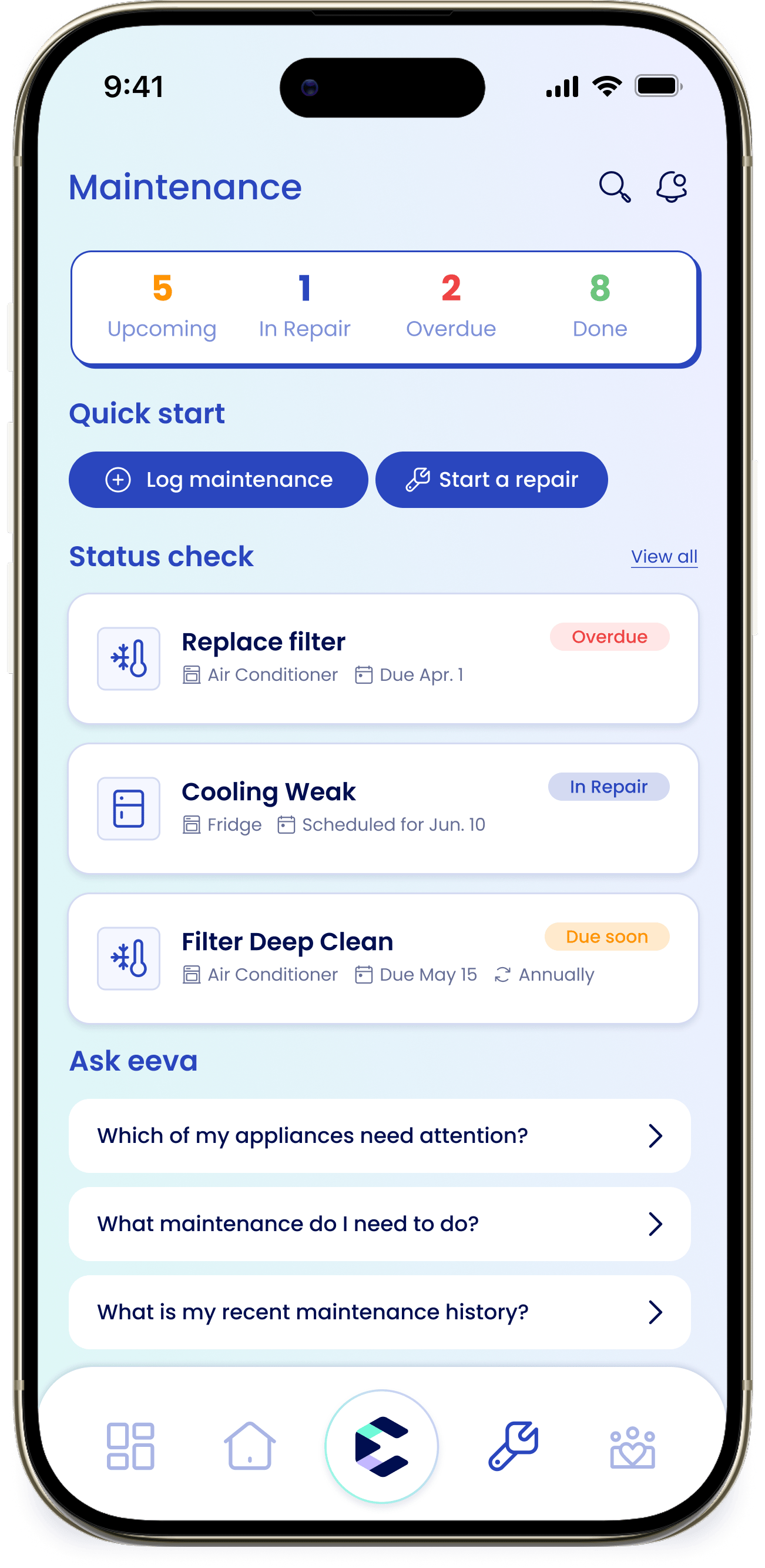
maintenance-tab.png — The Maintenance tab with the “Maintenance” title, the stats bar showing the “Upcoming”, “In Repair”, “Overdue”, and “Done” tiles, and the “Quick start” pills below.

Repairs vs. maintenance

eeva splits your work into two types, and the app asks which one you mean whenever you add something:

Repair

Something that broke or stopped working — a fridge that won’t cool, a washer that won’t drain.

Maintenance

Recurring or planned upkeep — replacing a filter, a deep clean, an annual inspection.
If you’re not sure, choose repair when something broke and maintenance for regular upkeep.

eeva suggests maintenance for you

You don’t have to schedule everything yourself. When you add an appliance, eeva can add recommended upkeep for it automatically — like a filter clean or an annual inspection — based on the appliance type. These appear in your maintenance list as upcoming items, and they’re yours to adjust: you can edit, reschedule, or remove any of them.

The stats bar

Four tiles across the top give you an at-a-glance count. Tap any tile to open your Maintenance Log already filtered to that group:

Upcoming

Planned work that’s coming up.

In Repair

Repairs that are active.

Overdue

Anything past its due date.

Done

Finished tasks and repairs.

Quick start

Two pills get you moving fast:

Log maintenance

Record planned or recurring upkeep.

Start a repair

Walk through eeva’s repair flow for something that broke.
Below them, a Status check section surfaces your in-progress, overdue, and upcoming items, and an Ask eeva section offers prompts if you’d rather ask in plain language.
New here? The empty state reads “Let’s get started!” with “Add your first appliance or log a maintenance task to begin.”

The Maintenance Log

The Maintenance Log is the full list of everything you’ve logged. Tap + to add a new entry. You can search, and filter with chips: All, Upcoming, Scheduled, Overdue, Done, Cancelled, and Archived. Each entry carries a status badge — In Repair, Overdue, Due soon, Done, or Archived.

Learn more

Log maintenance

Record recurring upkeep with reminders and calendar sync.

Repairs

File a repair and track it from start to finish.

How repair triage works

The 5-step wizard, warranty coverage, and manual-based tips.

Providers for repairs & maintenance

Link, contact, and book the people who service your home.

The Maintenance tab is where you handle two kinds of work on your home: fixing things that broke and staying ahead of routine upkeep. eeva keeps both in one running log, tracks their status, and reminds you before anything slips.

Screenshot to be added

maintenance-tab.png — The Maintenance tab with the “Maintenance” title, the stats bar showing the “Upcoming”, “In Repair”, “Overdue”, and “Done” tiles, and the “Quick start” pills below.

Repairs vs. maintenance

eeva splits your work into two types, and the app asks which one you mean whenever you add something:

Repair

Something that broke or stopped working — a fridge that won’t cool, a washer that won’t drain.

Maintenance

Recurring or planned upkeep — replacing a filter, a deep clean, an annual inspection.
If you’re not sure, choose repair when something broke and maintenance for regular upkeep.

eeva suggests maintenance for you

You don’t have to schedule everything yourself. When you add an appliance, eeva can add recommended upkeep for it automatically — like a filter clean or an annual inspection — based on the appliance type. These appear in your maintenance list as upcoming items, and they’re yours to adjust: you can edit, reschedule, or remove any of them.

The stats bar

Four tiles across the top give you an at-a-glance count. Tap any tile to open your Maintenance Log already filtered to that group:

Upcoming

Planned work that’s coming up.

In Repair

Repairs that are active.

Overdue

Anything past its due date.

Done

Finished tasks and repairs.

Quick start

Two pills get you moving fast:

Log maintenance

Record planned or recurring upkeep.

Start a repair

Walk through eeva’s repair flow for something that broke.
Below them, a Status check section surfaces your in-progress, overdue, and upcoming items, and an Ask eeva section offers prompts if you’d rather ask in plain language.
New here? The empty state reads “Let’s get started!” with “Add your first appliance or log a maintenance task to begin.”

The Maintenance Log

The Maintenance Log is the full list of everything you’ve logged. Tap + to add a new entry. You can search, and filter with chips: All, Upcoming, Scheduled, Overdue, Done, Cancelled, and Archived. Each entry carries a status badge — In Repair, Overdue, Due soon, Done, or Archived.

Learn more

Log maintenance

Record recurring upkeep with reminders and calendar sync.

Repairs

File a repair and track it from start to finish.

How repair triage works

The 5-step wizard, warranty coverage, and manual-based tips.

Providers for repairs & maintenance

Link, contact, and book the people who service your home.